MotionQL 1.3: one IDE for every database
The MotionQL team3 min read
MotionQL started as a MongoDB IDE. With 1.3 it becomes an IDE for every database you run: 60+ databases and hosted services, SQL and NoSQL, in one desktop app.
Why we did it
Most teams don't run one database. The orders live in PostgreSQL, sessions in Redis, search in Elasticsearch, events in ClickHouse, and the catalog in MongoDB. Working on one feature meant pgAdmin, a Redis GUI, Kibana, Compass and a terminal, each with its own habits and its own idea of what "production" means.
MotionQL now puts all of them in one window, with the same projects, the same production guards and the same AI assistant.
Each database keeps its own tools
We didn't want a lowest-common-denominator grid. Each family gets tools made for it:
- PostgreSQL, MySQL, SQL Server, Oracle, SQLite and DuckDB: a SQL editor with schema-aware completion, a visual query builder that joins on foreign keys, ER diagrams, EXPLAIN plans, and server insights such as pg_stat_statements, MySQL digests, locks and an index advisor.
- ClickHouse, Snowflake, BigQuery, Trino, Databricks and Spanner: the query log and storage panels, warehouses and credits, and a BigQuery cost guard that warns you before a query scans too much.
- Redis and Valkey: a key browser by namespace with every data type, a console with autocomplete, the slow log and memory panels.
- Elasticsearch and OpenSearch: Discover with a time range, documents, a console and index administration.
- DynamoDB, Cassandra, InfluxDB and Neo4j: scan and query with PartiQL, rows and CQL, Flux and SQL with charts, and Cypher with a graph view.
- MongoDB: everything you already know: the visual query builder, aggregation editor, IntelliShell, SQL Query and Compare & Sync.
The app rates each engine Deep or Good, and the Databases page shows the rating for every one.
Projects that keep production safe
A project groups one application's databases of every engine into Development, Test, Staging and Production. Production asks before every write, on every engine, and read-only environments refuse writes outright. The rule is enforced in the app's main process, not just the screen, and refusals go to the local audit log. More on projects.
Projects can also record cross-database links, such as orders.customerId in MongoDB pointing to customers.id in PostgreSQL. A linked value gets a small arrow that opens the related record on its own connection.
Logs & analytics for every server
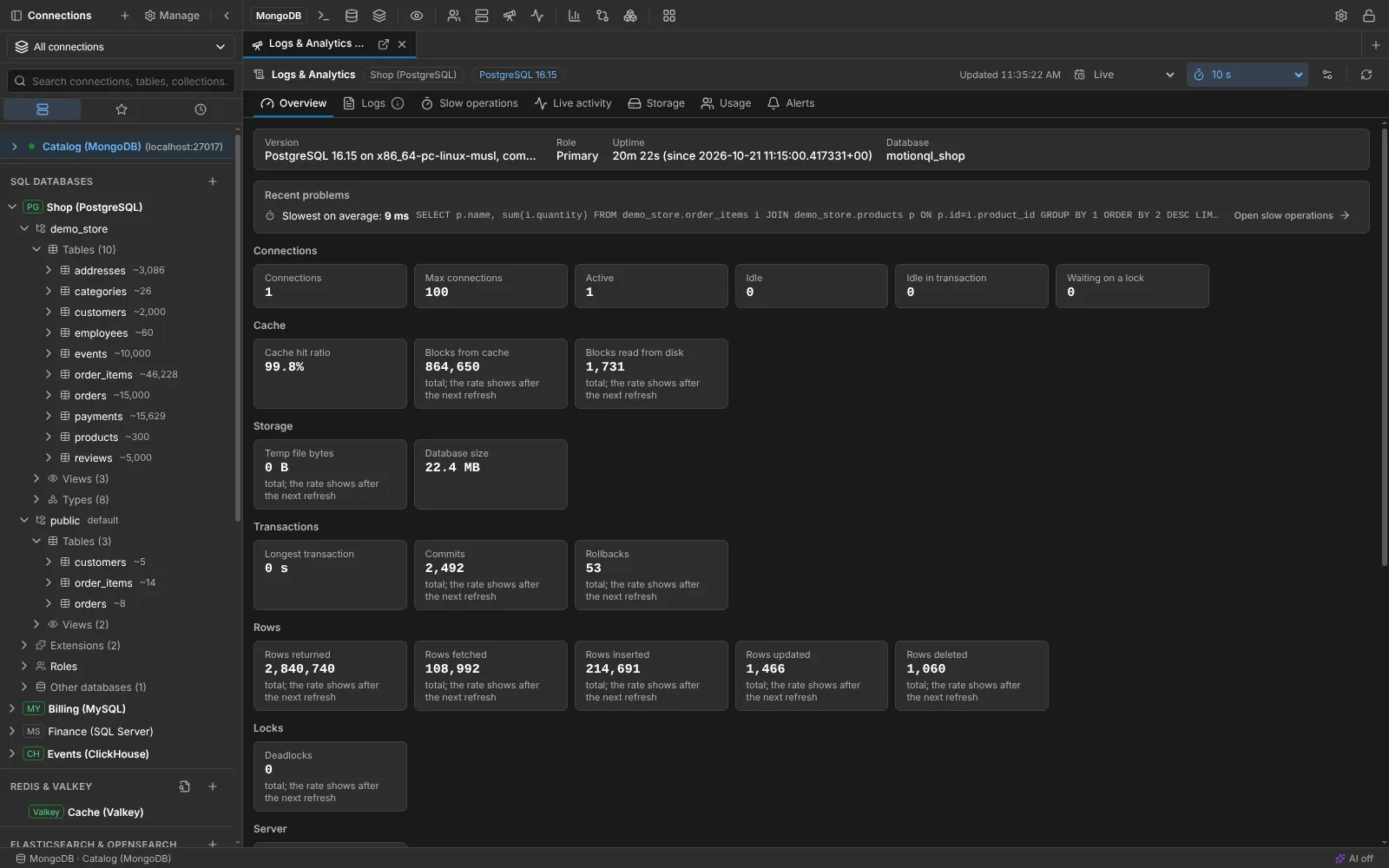
One tab per connection reads the server's own log, slow operations grouped by shape, live metrics and history the database already keeps. It works the same way for PostgreSQL, MySQL, SQL Server, Oracle, ClickHouse, the warehouses, Redis, Elasticsearch, Cassandra, Neo4j, InfluxDB, DynamoDB and MongoDB. More on Logs & analytics.
AI that knows each language
The AI assistant now writes and fixes SQL, MongoDB queries and pipelines, Cypher, CQL, Flux, Redis commands and search queries. Answers are checked against your schema and the engine's dialect before you see them. As before, it sends names and structure, never your rows, documents or credentials, and it is off for every connection until you allow it.
Switching is one step
Switch from… imports your connections and saved queries from DBeaver, DataGrip, pgAdmin, MySQL Workbench, Azure Data Studio, Navicat, Compass and Studio 3T. You can also paste a connection string from Vercel, Neon, Supabase, Prisma or Upstash and the dialog fills itself in.
Still free
The core app stays free for any use, including commercial work, and a Pro license is free for your first 12 months. Pro now also covers migration between databases, Git version control for your scripts, the PostgreSQL routine debugger, SQL schema and data compare, Supabase and Neon branches and Redis RDB analysis. See pricing and the full changelog.